How to Use a Traffic Analysis API to Retrieve Website Traffic Data at Scale
In SEO, data is often treated as a luxury.
Most teams check their own numbers once a month to see if rankings have moved, but looking only at your own site means you are flying blind. To understand your market, you need to see where competitors are winning and where they are vulnerable.
This is where a traffic analysis API changes the game.
Instead of clicking through dashboards for every rival, an API lets you pull visit data for thousands of domains at once. It puts your strategy in context.
In this guide, we explain what a traffic analysis API is, what data it provides, and how you use it to access website traffic data at scale.
What Is a Traffic Analysis API?
A traffic analysis API is a tool that lets you pull website traffic data directly into your own software. It removes the need to log in to a dashboard and manually enter one domain at a time. Instead, your software sends a request and gets the data back automatically.
You need to know where your data comes from to use it correctly. Traffic APIs generally fall into two categories:
First-party analytics APIs: Include tools such as the Google APIs that provide exact numbers but only for websites you actually own.
Third-party traffic APIs: Built for competitive intelligence. They provide estimated metrics for any domain on the web. Since you cannot access a competitor's private server, providers like Bishopi’s traffic analysis API model data from aggregated sources, such as anonymized panels and public records.
How Data Is Delivered
When you use an API, you are interacting with endpoints. An endpoint is a specific web address that returns a specific set of data.
For example:
A request to a traffic-overview endpoint might return total monthly visits.
A request to a geo-distribution endpoint might break those visits down by country.
The API returns this data in JSON format. This is a simple, structured text format that computers can read instantly. It allows you to pipe data into:
Internal dashboards: See your traffic and your rivals' side-by-side.
Market research: Scan hundreds of domains at once to see who is gaining ground in a specific niche.
Automated alerts: Set up a script to flag when a competitor’s traffic suddenly spikes.
The real power of an API is its ability to handle volume. While manual tools work for a few sites, an API lets you analyze thousands of sites. This provides a level of market insight that is impossible to reach through manual browsing.
What Website Traffic Data SEO Teams Can Access
A traffic analysis API provides a comprehensive view of your domain's digital footprint. While every provider is different, most allow you to pull these core datasets directly into your own tools:
Traffic Volume and Trends
This is the baseline for any analysis. You can retrieve the total number of monthly visits for any domain. Most APIs also let you pull historical data. This helps you see if a competitor's growth is a temporary spike or a long-term trend.
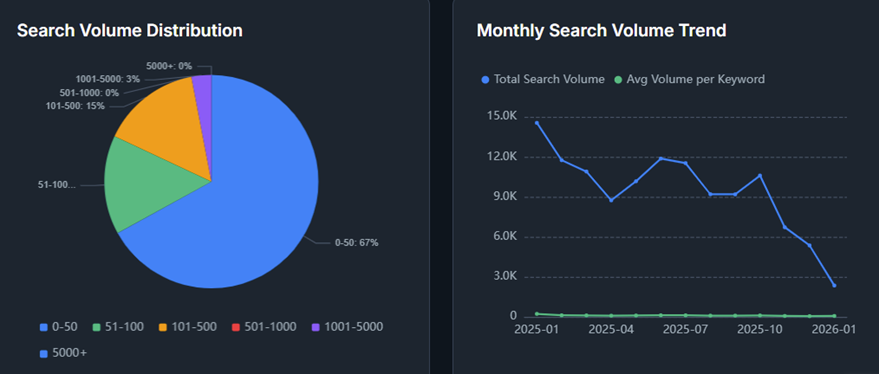
A screenshot of search volume and trends from a traffic analysis API
Traffic Source
Traffic source data shows where visitors are coming from. APIs typically break this down into several channels:
Organic search
Paid search
Direct traffic
Referral traffic
Social traffic
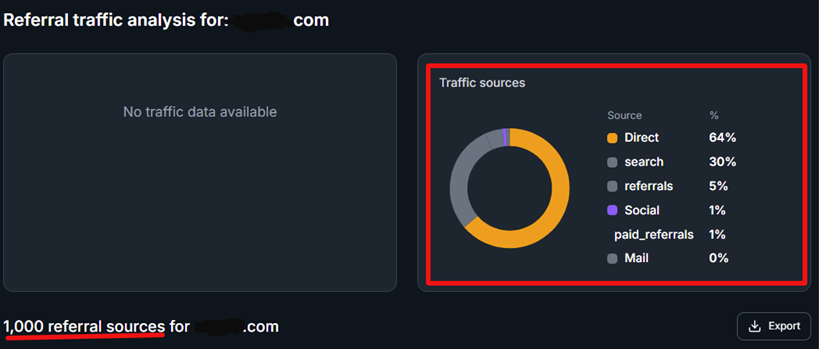
A screenshot of traffic sources from a traffic analysis API
This breakdown helps you understand how competitors generate their traffic. For example, a site with strong organic traffic likely relies heavily on SEO.
Geographic Distribution
Traffic APIs may also return country-level traffic data. This shows where visitors are located.
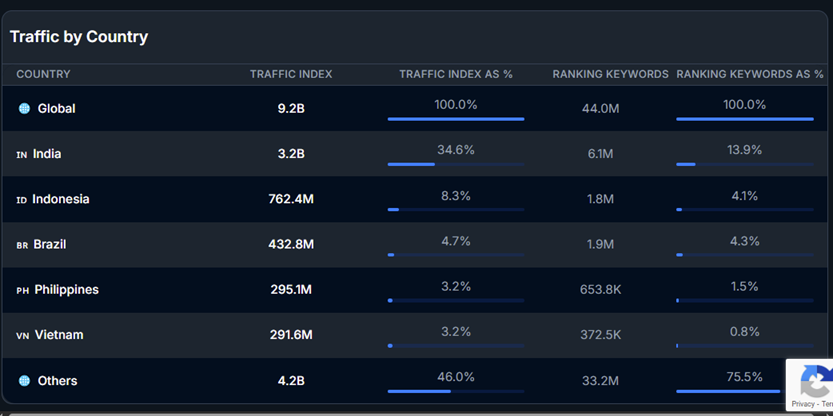
A screenshot of country-level traffic data
Geographic insights are useful when you want to:
Evaluate international demand
Identify key markets for a competitor
Understand where a site’s audience is concentrated
Engagement Signals
Some traffic APIs also include engagement metrics that describe how visitors interact with a site. Common examples include:
Pages per visit
Average visit duration
Bounce rate
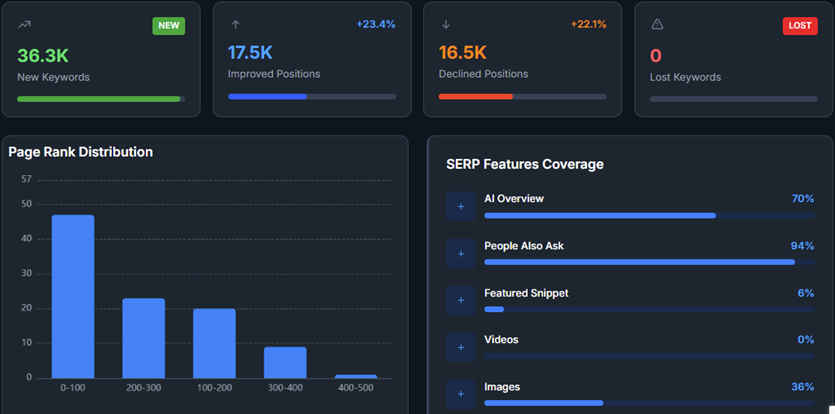
A screenshot of engagement signals from a traffic analysis API
These SEO data API metrics give you a rough sense of how engaged users are after they arrive on your website.
How to Access Website Traffic Data With a Traffic Analysis API
Using a website traffic intelligence API usually follows a few simple steps. Once you have access, you can request traffic data for any domain and work with the results in your own tools.
1. Get API Access
First, you’ll sign up with a provider to get an API Key. This is basically your digital ID card. It tells the provider who you are and what data you’re allowed to see.
How it works: You usually drop this key into the "header" of your request.
For example, Bishopi makes it easy to grab a key and start testing your first domain lookup in minutes.
2. Choose Your Endpoint
Pick a specific endpoint based on your needs. Think of an endpoint like a specific folder on a server. Each endpoint returns a specific type of information.
For traffic analysis, common endpoints include:
Domain traffic estimates
Traffic source breakdown
Historical traffic data
Geographic traffic distribution
3. Send an API Request
Next, send a request to the endpoint with the domain you want to analyze. Some APIs also support additional parameters, such as date ranges or country filters.
Here’s an example request:

An example of a traffic analysis API request
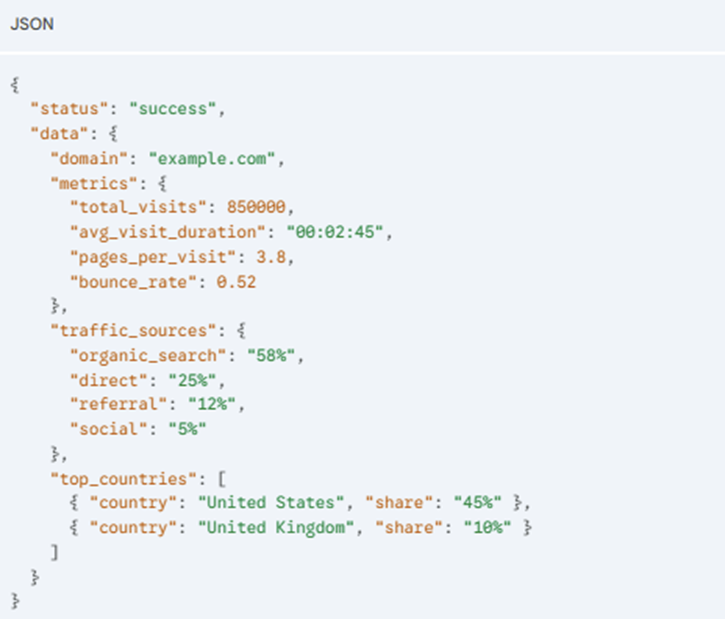
4. Parse the Response
The API returns the data in a structured format, usually JSON.
Here’s the returned JSON response for the above request:
An example of a JSON response
5. Store or Analyze the Data
Once you have the raw numbers, you can pipe them wherever you need them most. This can be in:
Google Sheets: Using a simple script to refresh competitor stats every week.
SQL Databases: To build a long-term history of how your rivals are growing.
Custom dashboards: To see your own traffic right next to the competition’s.
SEO Workflows That Can Be Powered by Traffic Analysis APIs
Once you pull traffic data through an API, many SEO tasks become easier to scale. Instead of checking domains one by one, you can analyze large sets of websites automatically.
Common workflows include:
Benchmarking the competition: An API lets you pull monthly visits and engagement for your top 50 rivals. You’ll see exactly where you sit in the market and capture it immediately if a competitor starts pulling ahead.
Tracking industry shifts: You can use a script to track traffic changes across an entire sector over time. If you notice a sudden 20% traffic spike for several sites in your niche, it’s a clear signal that a new trend or an algorithm update is shifting in that domain.
Spotting growth gaps: Comparing traffic sources reveals where you're leaving money on the table. If a rival gets 40% of their visits from referral links while you’re at 5%, you’ve found a clear area to focus on.
Powering internal tools: If you’re at an agency or on a product team, you can use these APIs to fuel your own platforms instead of sending clients to a third-party dashboard. It keeps your insights in one place and makes your data delivery much more professional.
Best Practices for Working With Traffic Analysis APIs
When using a traffic analysis API, a few practical habits can help you work with the data more effectively.
Here are tips to help keep your requests efficient and your SEO analysis more reliable:
Focus on trends, not snapshots: Look at traffic over time instead of relying on a single data point. Trends reveal real growth or decline.
Combine traffic with keyword data: Pair traffic estimates with ranking data to understand what is driving visibility.
Monitor API rate limits: Most APIs restrict the number of requests you can send. Plan your requests to avoid hitting those limits.
Cache frequently requested data: Store commonly requested results locally to reduce repeated API calls.
Standardize your datasets: Keep SEO metrics consistent when combining data from different sources. This makes analysis easier and more reliable.
Turn Traffic Data Into Scalable SEO Intelligence
The move from manual lookups to a traffic analysis API is what separates a basic SEO setup from a high-growth operation. It stops being about checking on a competitor once in a while and becomes about building a system that automatically tracks your entire market.
The real value is the ability to do this at scale. Whether you are building an internal dashboard or monitoring thousands of domains for a client, an API gives you a bird's-eye view that manual browsing cannot match.
Bishopi’s traffic analysis API simplifies this transition by providing the reliable, structured data you need to uncover insights that manual browsing cannot.
Get started today to see how this works.
FAQs
How do you analyze website traffic data?
Start by comparing your engagement metrics against the industry average to find gaps. Look at traffic sources (organic vs. paid) to see where rivals are investing and check their top-performing pages to identify content themes you might be missing.
Can you get a website traffic data API for free?
Many providers offer a limited free tier or a trial period to let you test their API. While free versions are great for small, one-off lookups, a paid plan is usually necessary for the high-volume data needed to track an entire industry or build your own dashboards.
With Bishopi, you can stay on the free plan and only purchase API credits when needed.
What is the best website traffic checker?
The best traffic checker depends on what you want to analyze. Some tools provide first-party analytics for your own website, while third-party traffic intelligence tools estimate traffic for any domain and help with competitor research.
Common tools include Google Analytics, Semrush, Ahrefs, and Bishopi’s Website Traffic API.
Originally published at: bishopi.io
Stay up to date
Get updated with all the news, update and upcoming features.