Cost-Effective SEO Tools for Small Businesses
You don’t need a huge budget for SEO tools to rank on Google.
For most small business owners, indie developers, startup founders, and lean marketing teams, if you wanted to do serious SEO, you’d definitely choose Semrush or Ahrefs. And that’s understandable.
These are positioned as the go-to tools for most SEO workflows. However, they can be too costly for a small business working on a tight budget.
This article explores the best SEO tools for small businesses looking to spend $100 or less per month on SEO. We’ll explore what each one does well, where each one falls short, plus one affordable option that fills those gaps without blowing your budget.
The Best SEO Tools for Small Businesses on a Budget
Here are the best tools for affordable SEO at a glance.
Tool | Purpose | Cost |
Google Keyword Planner | Discover new high-volume keywords, analyze search volumes, and determine advertising costs | Free |
Google Search Console | Organic rankings, CTR, indexing, technical site health, and crawling errors | Free |
Google Analytics 4 | Traffic & conversion tracking | Free |
Screaming Frog (free tier) | Site crawl & technical audit (up to 500 URLs per site) | Free |
Ahrefs Webmaster Tools | Traffic, performance data, and backlinks for your own site only | Free |
Bishopi | Keyword research, competitor analysis, SERP monitoring, backlink data | $25/month |
The free SEO tools in this stack cover a lot of ground. They reveal rankings, traffic, technical health, and your own backlinks.
However, they all have one thing in common: they only show you SEO data about your site and not what’s happening in your market.
API-first SEO platforms like Bishopi can fill this gap. While not 100% free, it handles what the free tools structurally cannot at a fraction of the cost of most premium SEO tools.
For instance, with a single monthly subscription of $25, you get a complete suite of SEO tools for keyword research, comprehensive SEO analysis, and competitor insights.
1. Free SEO Tools for Keyword Research: Google Keyword Planner
Most SEO strategies fail in keyword research, especially on a budget.
Here is why:
Most budget SEO teams go to Google Keyword Planner for keyword research. The tool provides accurate, direct-from-Google search volume data and ideas. You can also use it to identify high-volume search terms and assess keyword seasonality.
But it has three limitations.
The tool groups similar keywords together and shows search volume ranges like 1K-5K, not exact numbers, unless you're running active paid campaigns. This can be difficult if you’re trying to decide between two keywords that might have very different ranking potential.
Beyond vague volume data, Keyword Planner does not provide keyword difficulty data, meaning you can’t gauge how hard or easy it will be to rank for a given term. Instead, it shows how competitive a keyword is for Google Ads bidding.
It also shows no competitor data. You can't see what keywords a competing domain ranks for, what content is driving their traffic, or where your gaps are.
It skews heavily toward commercial, high-volume keywords, giving almost no visibility into the long-tail, low-competition queries where small sites can realistically compete.
You can use Ahrefs or Semrush free trials for this, but they are limited in functionality.
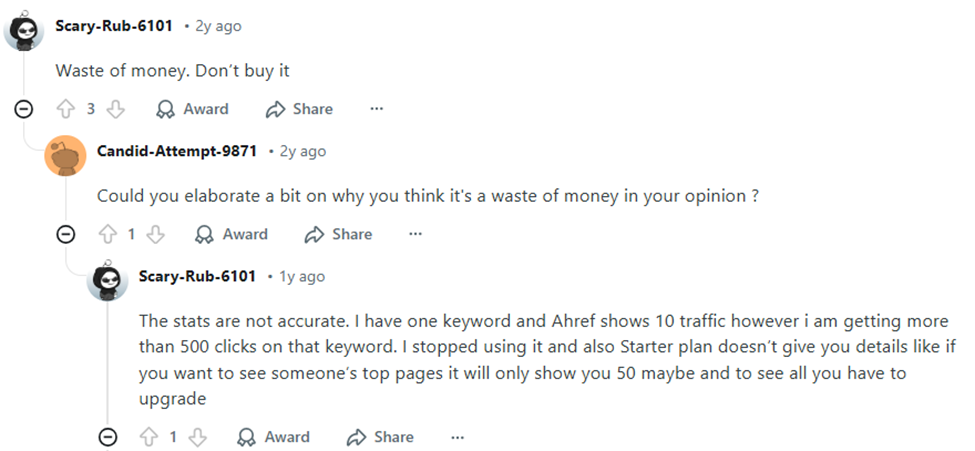
Both severely throttle free users. For instance, Ahrefs' Starter plan costs $29/month and gives 100 monthly credits. While this is enough for occasional lookups, credits drain fast. A single site audit of a 200-page site can consume the month's allowance.
Competitor analysis and Content Explorer are not included. For a small business actively running keyword research and content planning, 100 credits per month is insufficient.
You’ll need a higher plan for this, which can be expensive for a small business owner on a $100/month budget.
Here is a Reddit thread of a frustrated user of the Starter plan:
Bishopi’s keyword explorer can fill this gap. You get accurate search volume, CPC, keyword difficulty, and competitive gap data in a single view.
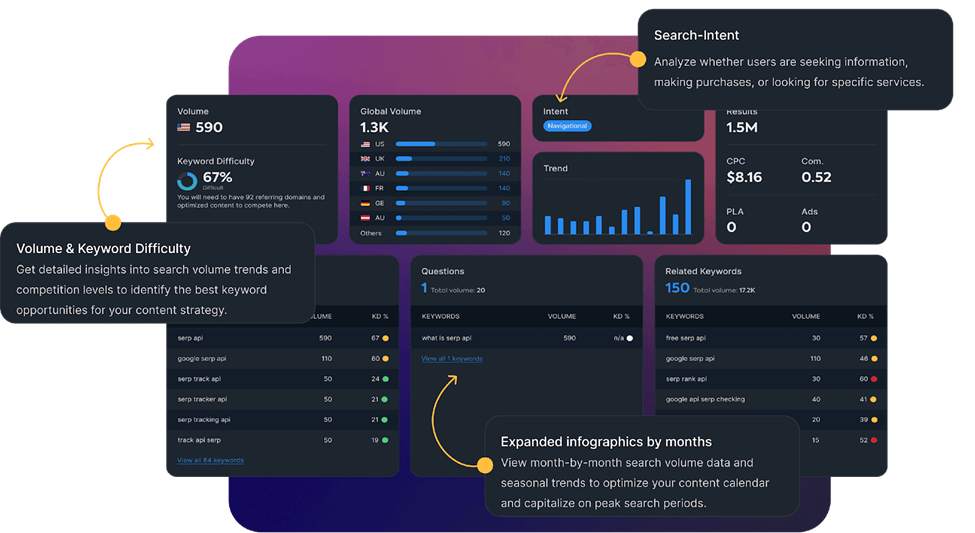
Using this tool, you can:
Pull keyword data and check difficulty scores against your actual domain authority
Find low-competition gaps in your niche that larger competitors are ignoring
Identify the pages worth prioritizing for content investment vs. quick optimization wins
Scaling Keyword Research
For teams that need programmatic access to keyword data, for instance, developers building internal SEO tools, agencies automating reporting, or SaaS founders doing bulk research across dozens of categories, the SERP API can:
Pull thousands of long-tail keyword variations from seed keywords, including Google Autocomplete keyword suggestions, related searches, and “People Also Ask” data
Integrate directly into your own dashboards and workflows without manually exporting from a tool UI
2. DIY SEO Tools for Rank Tracking — Google Search Console
Google Search Console (GSC) is one of the best free SEO tools that provides accurate, direct data on a website's SEO performance, including average positions, clicks, and impressions.
The tool’s Performance report reveals every query that earned an impression or click, the exact average position you hold for each keyword, and the click-through rate you're achieving. Using this tool, you can:
Filter by page to see which pieces of content drive the most organic traffic then double down on those topics.
Sort by impressions with low CTR. Those are keywords where you're visible but not compelling. You can then fix your title tags and meta descriptions.
Use the Coverage report alongside Screaming Frog to cross-reference crawl errors with indexing issues.
While GSC is positioned as one of the best free SEO tools for small businesses, it has some significant limitations.
It only shows your own site’s performance data. You get no visibility into what your competitors rank for, how their visibility has changed, or which of their pages are outperforming yours.
GSC restricts data to a 16-month history, which hinders long-term year-over-year (YoY) analysis.
The UI limits export to 1000 rows for query/URL reports. Even API access is capped at 50,000 rows per day per site.
It doesn’t display reports in real-time and often experiences processing delays of 1–2 days.
Using Bishopi’s domain SEO analysis tool, you can track your site’s performance, analyze competitors, monitor their search rankings, and analyze their traffic sources in a single view.
All you need to do is to enter your competitor’s domain and get visibility into their search visibility, which terms they rank for, at what positions, and where your content has an opportunity to outrank them.
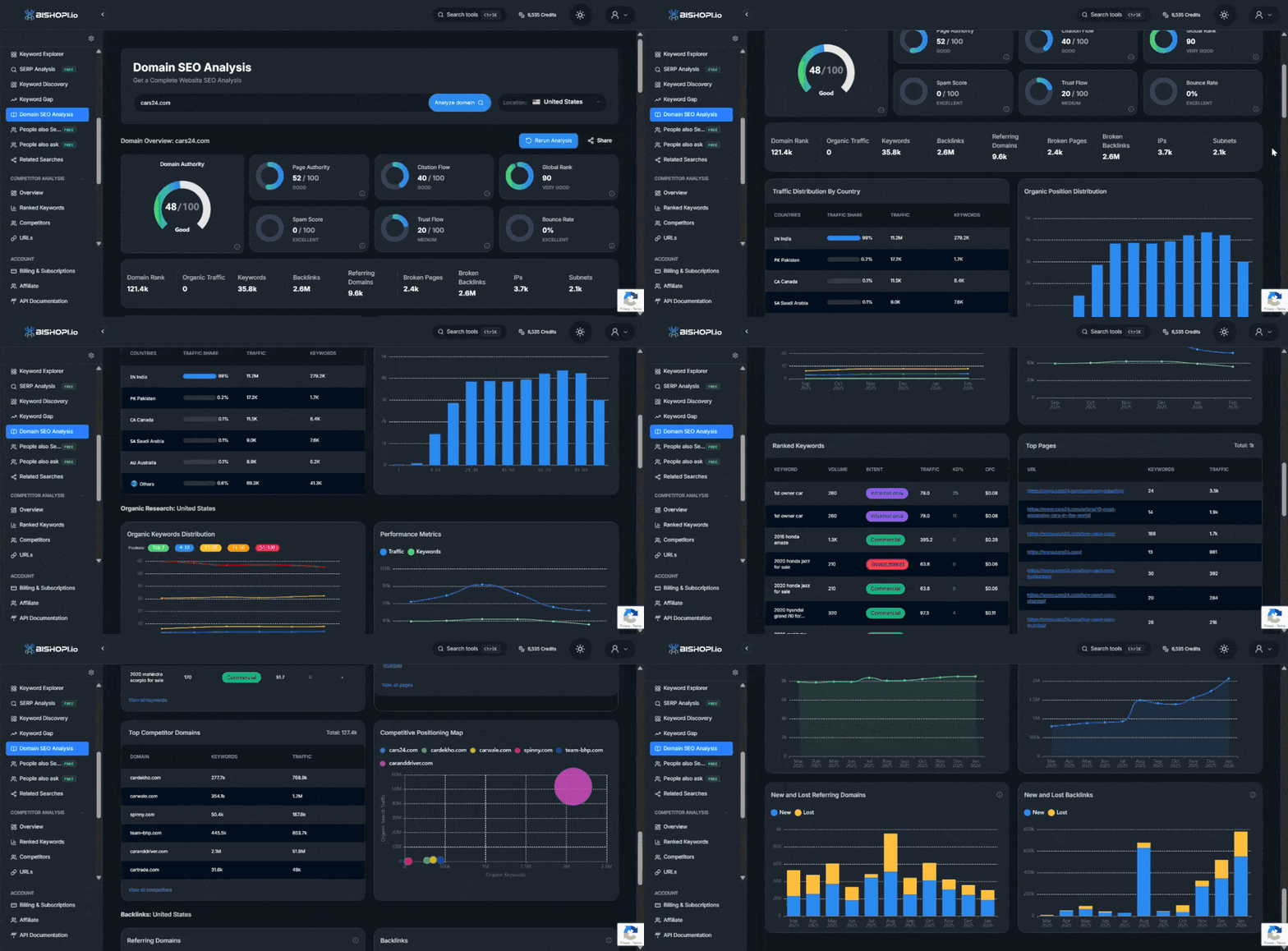
Overall, while GSC tells you where your site is in terms of search performance, Bishopi tells you where your site and the competition are, and where you should be targeting next.
3. Best SEO Tools for Site Audit — Screaming Frog Free Tier
Using the Screaming Frog free tier, you can perform a technical SEO audit on small websites or small sections of a large website and crawl up to 500 URLs per site.
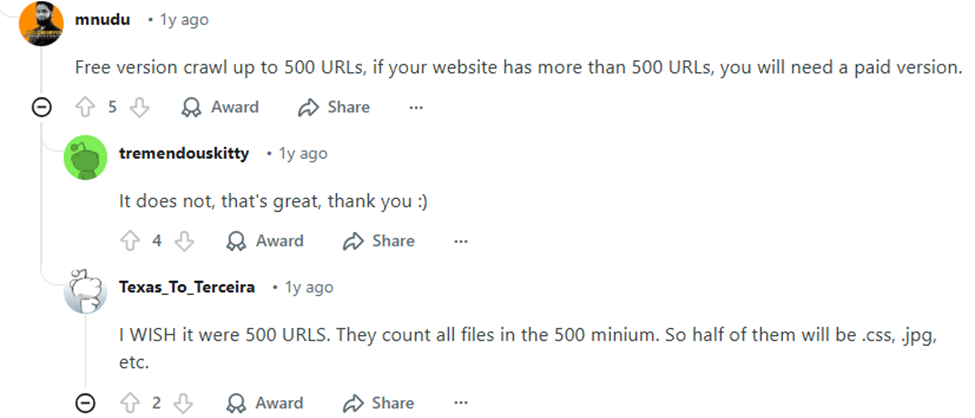
This is enough for a local service business, a SaaS landing page set, or a boutique e-commerce store.
The tool can help you:
Identify broken links that damage crawl budget and user experience
Uncover missing or duplicate meta tags that hurt page-level targeting
Redirect chains that slow down crawl efficiency, and thin pages with little or no content that dilute your site’s overall topical authority.
Create XML sitemaps for smaller sites.
Identifies blocked URLs, canonical tags, and noindex directives.
The free plan doesn’t include scheduled crawls or cloud storage. It also doesn’t support saving crawls, JavaScript rendering, or integrations with APIs like Google Analytics/Search Console.
What’s more, if your site has more than 500 pages, you’ll need to purchase a paid license, which costs around $279 per year.
4. Best Free SEO Tools for Backlink Monitoring — Ahrefs Webmaster Tools
Ahrefs Webmaster Tools is free for verified site owners and helps you monitor your website’s backlink profile, health, and search performance. It bridges gaps in Google Search Console by helping you:
Track new and lost backlinks so you catch any sudden drops in referring domains quickly
Detect potentially toxic links early and submit disavow files before they cause a manual action
Monitor referring domain growth month-over-month as a signal of link-building momentum
Evaluate backlinks using metrics such as Domain Rating (DR) and URL Rating (UR).
You can only use Ahrefs Webmaster Tools up to a certain limit.
The tool allows you to monitor backlink profiles for a website you own and have verified via Google Search Console, DNS, or file upload. You have no visibility into who links to your competitors, what anchor text strategies they use, or where the link gaps in your niche are. Competitor analysis is restricted to paid plans.
The Site Explorer report only shows up to 1000 backlinks at once. If your website has over a thousand backlinks, you will not see the full picture in a single view.
If you’re looking to build a serious link acquisition strategy, you will need to either upgrade to a paid plan, which can be costly, or use affordable Ahrefs alternatives.
Using a backlink analytics tool like the one offered by Bishopi, you can uncover the data that Ahrefs Webmaster Tools misses.
The tool can reveal websites linking to your competitors, anchor text strategies they are using, high-authority publishers in your niche that are worth pursuing, and more.
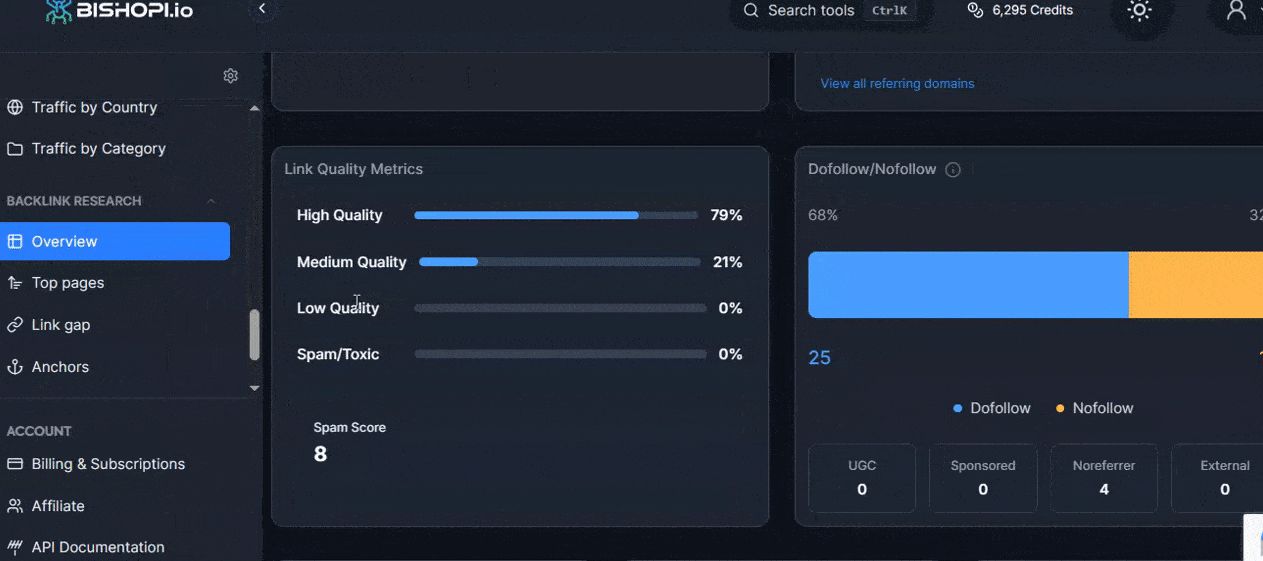
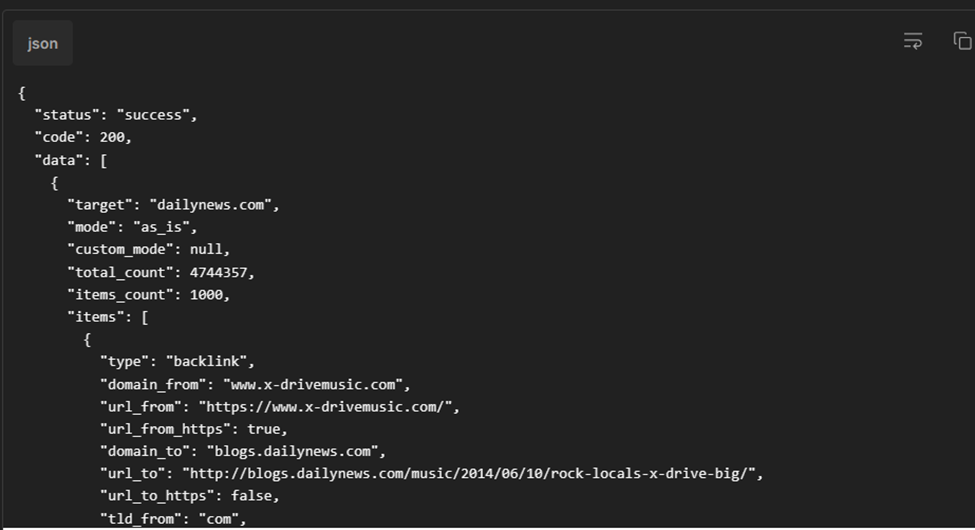
If you’re running link prospecting at scale, the backlink analysis API allows you to identify high-value backlink opportunities and monitor competitor links with a speed of up to 4.2 million page crawls per minute.
5. SEO Tools for Competitor Intelligence
On a tight budget, competitor keyword analysis is a high-leverage, low-cost strategy you can use to reverse-engineer success and outrank competitors without needing expensive content tools or creating a content strategy from scratch.
You just need to analyze the search terms that drive traffic to sites ranking above you, identify topics they cover but fail to dominate, and create 10X better, more comprehensive content to fill those gaps.
Google Search Console “Performance by page” reveals which of your pages rank for specific queries and lets you spot nearby competing URLs, though manually. The tool is useful for identifying overlap, but stops short of true competitor mapping.
Using Bishopi competitor analysis tool you can automate discovery and unlock deeper competitor insights.
The tool is among the top Semrush alternatives that can help you reverse-engineer the keyword footprint of any domain on a budget.
You can use it for the following processes:
Keyword gap analysis: You canfind keywords your competitors rank for in positions 1—10 that your site doesn't appear in.
Identify high-traffic pages: Identify which pages on competing sites drive the most organic traffic.
Reverse-engineering winning pages: Analyze the on-page signals, keyword coverage, and content depth of top-ranking competitor pages. You can then build something 10x better and target the same terms.
6. Free SEO Tools for Tracking Traffic & Conversions — Google Analytics 4
Google Analytics 4 (GA4) is free and covers half of your SEO picture that tools like Ahrefs and GSC don’t. It shows you what happens after someone lands on your site. Where GSC tells you what search terms brought visitors, GA4 tells you what those visitors did when they arrived.
You can connect it directly with Google Search Console and see what happens after someone lands on your site from organic search.
Specifically, you can use GA4 to:
Track organic traffic growth month-over-month
Identify which landing pages drive goal completions (sign-ups, purchases, contact form submissions)
Spot pages with high organic traffic but poor conversion rates
Similar to Google Search Console, GA4 only shows your own website’s performance data and not your competitors’.
Using a website traffic API like the one offered by Bishopi, you get estimated traffic data for any domain at scale. You can benchmark your traffic performance against competitors and uncover their strategies.
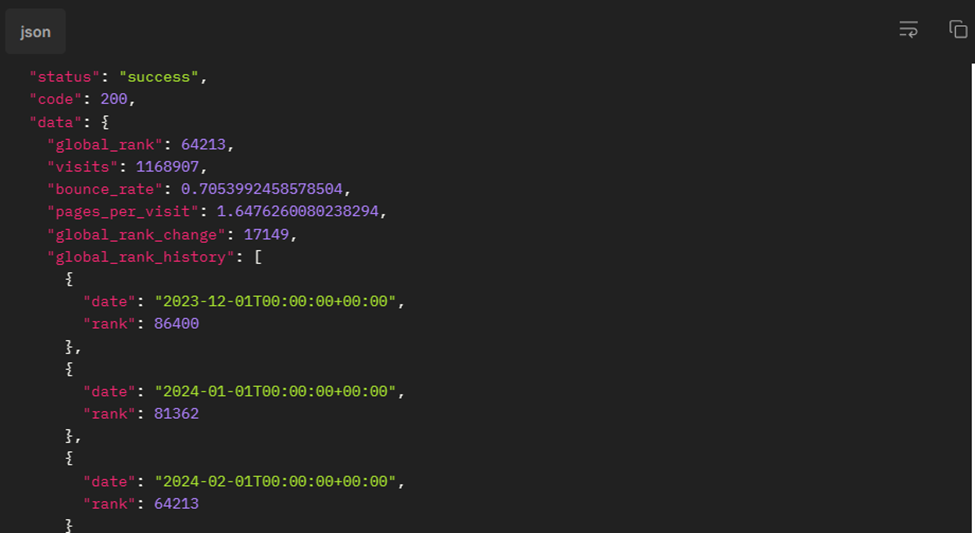
The API reveals detailed competitive intelligence insights, including where your competitors get their traffic, which keywords drive their success, and how you can capture market share.
Smarter SEO on a Budget
Free SEO tools like Google Search Console, Google Analytics, and Screaming Frog’s free tier provide an incredibly strong foundation for small businesses. They help you understand your site’s performance, fix technical issues, and track growth without spending a cent.
However, they have significant limitations that can hinder you from executing powerful SEO campaigns.
They only reveal what’s happening on your site, but not what’s driving success in your market. They lack competitor keywords and backlink insights, and provide restricted data depth.
If you’re looking to invest $100 per month, an affordable SEO tool like Bishopi can fill the critical gaps free tools leave behind, especially in keyword research, competitor analysis, and market visibility.
Explore Bishopi’s SEO tools and unlock competitor data your free tools miss.
Frequently Asked Questions
Can I do SEO on a budget without paying for costly tools?
Yes, you can do SEO on a budget using free tools like Google Search Console, Google Analytics, Screaming Frog free tier, and Ahrefs Webmaster Tools. These help you track rankings, traffic, and technical issues. However, these tools reveal SEO data for your own website. You’ll need affordable SEO tools like those offered by Bishopi to access competitor data and uncover growth opportunities beyond your own site.
How do I know when it's time to pay for SEO tools?
You should invest in SEO tools when free options no longer provide enough data to grow. For instance, if you need competitor keyword insights, analyze backlinks deeply, or scale research efficiently, it’s time to upgrade. Investing in an affordable tool can help you find new opportunities and compete more effectively in your niche.
What are the best affordable SEO tools for beginners?
You should start with beginner-friendly tools like Google Search Console, Google Analytics, and Google Keyword Planner to build a strong foundation. As you grow, you can add affordable tools like Bishopi to access keyword research, competitor insights, and SERP tracking without exceeding your budget.
Which SEO tool is best for small businesses?
You get the best results by combining free tools with one affordable paid platform. Use free tools to monitor performance and fix issues, then use an affordable paid platform to analyze competitors, discover keyword gaps, and strengthen your overall SEO strategy within a limited budget.
Originally published at: www.bishopi.io
Stay up to date
Get updated with all the news, update and upcoming features.